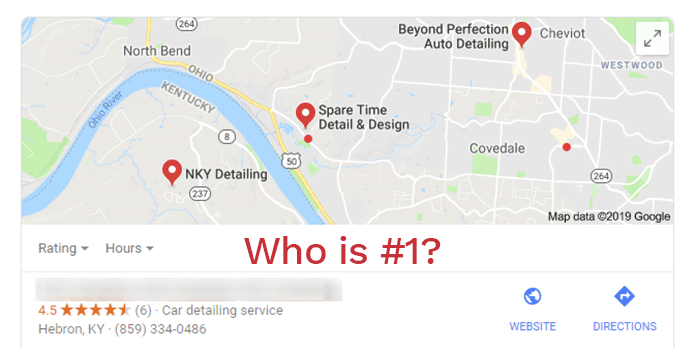

When someone looks for a detailer, they usually open Google, check the map results, and read the reviews before they ever call. The work you just finished on their car is the best moment to ask for one of those reviews, and most shops let that moment pass.
This guide is a policy-safe system for getting more Google reviews: what Google allows, what it doesn’t, how to get your official review link and QR code, and copy-ready scripts you can send after the job. It’s written by the Pro Detailing team. Ben is the owner of TR Detail (Tabula Rasa Fine Auto Detailing) in Chantilly, VA, and has years of experience running a high-end shop. Michael Flanagan leads marketing and business growth. For the broader growth plan this fits into, start with our guide on how to grow a detailing business.
Why Google Reviews Matter for a Detailing Shop
Your Google Business Profile is often the first page a customer sees. Reviews show next to that profile in Google Search and Maps, alongside your photos, hours, and services, and they help a stranger decide whether to trust you with their car.
That does not mean more reviews automatically move you to the top of local results, and nobody can honestly promise that. What reviews do well is give people evidence of real work: the kind of cars you do, how you communicate, and whether customers felt taken care of.
If your profile is still incomplete, fix that first. Our Google My Business step-by-step guide for detailers walks through setup (Google now calls this Google Business Profile). Then come back here and make asking for reviews a regular part of closing out each job.
What’s Allowed, and What Will Get You in Trouble
Google wants reviews to reflect a genuine experience. You can ask customers to leave one. You cannot pay for them, filter them, or try to steer the rating. The rules below follow Google’s own guidance for getting reviews and its prohibited and restricted content policy. Google can update these policies, so read the official pages and adjust if they change.
You can:
- Ask customers who actually used your shop to share their experience.
- Send a direct Google review link, or offer a QR code, in a thank-you text, email, or receipt.
- Display a QR code in the shop or on an invoice, as long as you don’t pressure anyone to use it on the spot.
- Reply to reviews, including critical ones.
You should not:
- Offer any incentive for a review: discounts, free add-ons, gift cards, future credits, or “leave a review and get 10% off.” That includes incentives to change or remove a review.
- Ask only happy customers, or say “if you had a great experience, leave a review; if not, call us instead.” That is selective solicitation, sometimes called review gating, and Google does not allow it.
- Require or pressure someone to write a review while they are still at the shop, or tell them what to say or what star rating to leave.
- Post reviews yourself, ask staff, friends, or family to review you, or review a competitor to undercut them.
- Promise a customer something in exchange for taking down a negative review.
The simple test: ask every real customer, after the job, without a reward and without scripting the review.
Make Asking a System, Not a Mood
Shops that get reviews steadily usually aren’t lucky. They ask every customer, the same way, every time. In a high-end shop like Ben’s, the close of a job already has a checklist: final walkaround, payment, aftercare. Adding “send the review link” to that list is what makes it happen when the day gets busy.
Build it into the closeout, not into a speech at the door:
- Ask everyone. Not just the customers who were smiling at pickup, and not just coating or PPF jobs. If they were a real customer, they get the same ask.
- Ask after they have the car. A short text or email once they’ve seen the finished work is clearer, and it avoids pressuring anyone on the premises.
- Use one official link. Don’t send people to a generic “find us on Google” search. Send the review link Google gives you, so they land on the form.
- Keep a simple record. A note in your booking system (“review link sent, Nov 13”) stops you from chasing the same person and shows you who was skipped.
- Send one reminder, at most. If they don’t leave a review, one polite follow-up a few days later is enough. Repeated asks start to feel like pressure.
The best time is while the job is still fresh, usually the same day or the next. Waiting weeks means more people forget.
How to Get Your Google Review Link and QR Code
Google lets you create a review link and a QR code from your Business Profile. As of Google’s current help article, the QR code can only be generated in a computer browser, not in the mobile app.
- Open your Google Business Profile on a computer.
- Go to Read Reviews, then Get more reviews.
- Copy the review link. To save the QR code, right-click it and choose Save image as.
Google also lets you share that request by email or other channels from the same screen. The official steps live here: Create a Google link or QR code to request reviews. The button names can change, so if you don’t see “Get more reviews,” use that article as the source of truth.
Put the link in your thank-you text and email templates. You can print the QR code on a receipt, a business card, or an aftercare sheet. Leave it available. Don’t stand over the customer and wait for them to scan it before they leave.
One practical note: a customer has to be signed into a Google Account to post a review. They can create one with a non-Gmail address. If someone tells you the form asked them to sign in, that’s expected, not a broken link.
Copy-Ready Scripts You Can Use Today
Edit the brackets to match your shop, then send these as they are. Do not add a discount, a “only if you loved it” line, or a request for five stars. Those small changes are what turn a normal ask into a policy problem.
Text message, after pickup:
Hi [Name], it’s [Your Name] at [Shop Name]. Thanks for trusting us with your [vehicle]. If you’d like to share your experience, you can leave a Google review here: [review link]. We read every one. Thank you.
Email, same day or next morning:
Subject: Thank you from [Shop Name]
Hi [Name],
Thank you for bringing in your [vehicle] for [service]. We appreciate your business.
If you’d like to share your experience, you can leave a Google review here: [review link]
We read every review and use the feedback to keep improving. Thank you again,
[Your Name]
[Shop Name]
[Phone]
In person, without pressure:
“I’ll text you a Google review link after you leave. If you’d like to share your experience, it’s a big help. No need to do it now.”
Then actually send the text. The in-person line should be a heads-up, not a request to stand there and write the review.
One follow-up, a few days later (only if they haven’t reviewed):
Hi [Name], just a quick thank-you again from [Shop Name]. If you have a minute to share your experience on Google, here’s the link: [review link]. Either way, we’re grateful for your business.
Phrases to avoid:
- “If you had a 5-star experience, leave us a review. If not, please call us.”
- “Leave a review and get $10 off your next detail.”
- “Please mention my name and give us five stars.”
- “I can take a little off the invoice if you review us before you go.”
If you want help writing other customer messages, our guide on how to use AI to grow your detailing business has prompts for replies and follow-ups. Keep the policy rules above in the prompt so a draft doesn’t slip into incentives or gating.
After the Review: Reply, and Don’t Bargain
Asking is only half of the system. People read your replies too. Thank customers by name when you can, mention the service if they did, and keep it short. Don’t use a reply to pitch a discount or a new package.
Critical reviews are part of a normal profile. Stay calm, acknowledge the issue, and invite the person to contact you directly to make it right. Don’t argue in public, don’t share private details, and don’t offer a credit or free service in exchange for an edit or a takedown. If a review is fake, off-topic, or otherwise breaks Google’s rules, flag it in the profile rather than fighting it in the comments.
The standard is simple: reply to every review, be specific, and take disagreements offline.
If you’d rather not run this yourself, our Growth plan includes review requests to real customers after the job, plus replies, as part of Google Business Profile management. We don’t write reviews, pay for them, or filter out the critical ones, and we won’t promise a number of reviews or a ranking.
FAQ
Can I offer a discount or a free add-on for a Google review?
No. Google treats rewards for posting, changing, or removing a review as fake engagement. That includes money, discounts, free services, and other perks. Ask for the review, and leave it at that.
Should I only ask customers who were happy?
No. Ask every real customer the same way. Only asking satisfied customers, or sending unhappy customers to a private form instead of Google, is the kind of selective ask Google doesn’t allow. Honest reviews, including critical ones, are allowed and often look more credible.
When should a mobile detailer ask?
Same system as a shop: send the link after the job, once the customer has seen the work. A service-area business can still receive Google reviews. Keep the QR code on your invoice or aftercare sheet if you want, and don’t pressure anyone to review while you’re still in their driveway.
How many reviews do I need?
There’s no honest number to aim at, and we won’t invent one. What you can control is consistency: ask every customer, use the official link, and keep the reviews genuine. A slow, steady stream beats a sudden burst that looks unnatural.
What if a customer leaves a negative review?
Reply promptly and professionally. Thank them for the feedback, address the issue without getting defensive, and offer a way to reach you directly. Don’t offer a refund or a discount as a condition of changing the review. If the review violates Google’s content policies, flag it.
Why didn’t my customer’s review show up right away?
Google decides when reviews appear, and customers have to be signed into a Google Account to post. We can’t promise a timeframe. If a review is missing, have the customer confirm they submitted it while signed in. If you believe it was removed in error, use Google’s own tools to look into it rather than asking them to post again from another account.
Get the Next Step in Place
A complete Google Business Profile, a direct review link, and a short message after every job will do more for your reviews than any one-off campaign. That’s the habit. The scripts above are enough to start today.
Want a second set of eyes from people who know both the shop floor and the marketing side? See our plans and book your onboarding and coaching call. Certified Pro includes a listing on Pro Detailing and an initial coaching call. If you don’t have a listing yet, claim it for free or add your shop.